Built for TekLan VPN clients

Set up your VPN.
One clear control centre.

The Dashboard replaces the old OpenVPN setup process and adds WireGuard setup. Create a QR code or .conf file for WireGuard, or download an OpenVPN profile and view its credentials.

  • No separate Dashboard password
  • WireGuard and OpenVPN
  • Included for TekLan VPN clients
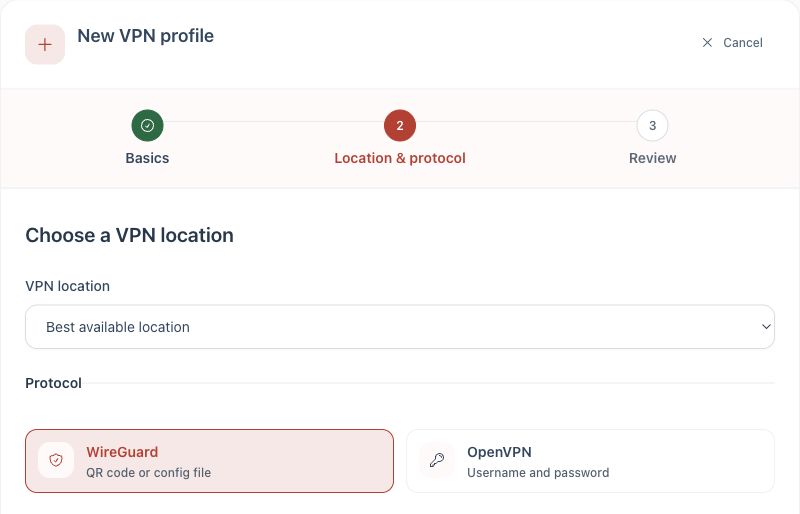
TekLan VPN Dashboard screen for choosing a VPN location and selecting WireGuard or OpenVPN
The actual Dashboard screen used to choose a location and protocol.
Client area accessOpen the Dashboard securely from your TekLan VPN service.
OpenVPN setup replacedUse the Dashboard instead of the old OpenVPN setup process.
WireGuard setupScan a QR code, download or email the .conf file, or use a one-time device code.
TekLan supportOur UK team is still here when you want a real person.
Useful controls, clearly presented

Your new VPN setup process

The Dashboard handles OpenVPN and configuration-file setup. Your client area remains the home for billing, renewals and account details.

Add a device

Name the device, choose WireGuard or OpenVPN and create its own VPN profile.

Get the configuration

Download it directly, queue it to the client-account email address or move a WireGuard profile with a one-time device code.

Scan on mobile

Use QR-based setup where the selected protocol and device support it.

Keep profiles organised

Give profiles recognisable names so laptops, phones, routers and other devices remain easy to identify.

Replace a configuration

Generate a fresh configuration when a device changes or an old profile should no longer be used.

Remove old devices

Revoke profiles you no longer need instead of leaving forgotten configurations active.

Device first

From device to connected in three clear stages

Start with what you are setting up. The Dashboard then gives you the right profile and delivery options for that device.

Browse device guides
  1. 1
    Choose your device

    Start with Windows, Android, Apple devices, Linux, a router or another supported platform.

  2. 2
    Create its profile

    Open your service from the client area and choose WireGuard or OpenVPN.

  3. 3
    Deliver and install it

    Download or email the profile, scan a supported QR code or use a WireGuard device code at dash.teklanvpn.com/get.