
15 September 2026 · TekLan VPN
The TekLan VPN apps cover phones, tablets, computers, TVs and browsers. But plenty of devices can't run an app: routers, NAS drives, Linux machines, and the consoles and smart TVs that sit behind a router. For those, the VPN Dashboard makes a standard WireGuard or OpenVPN profile that the device's own VPN settings can use.
Quick answer
- Sign in at teklanvpn.com/account, open your VPN service and choose Manage VPN Dashboard.
- Choose Add device, name it, pick a location and a protocol, then choose Create VPN profile.
- Move the profile to the device by download, email or a one-time code, and import it there.
Opening the Dashboard
- Sign in to the client area with your email address and password.
- Open your active VPN service.
- Choose Manage VPN Dashboard.
There's no separate Dashboard account or password. It opens straight from your service.
Creating a profile
Choose Add device. Creating a profile takes three steps.
1. Basics. Give the profile a name that says which device it's for, such as "Living room router" or "Synology NAS". You'll be glad of it when you want to tell profiles apart later.
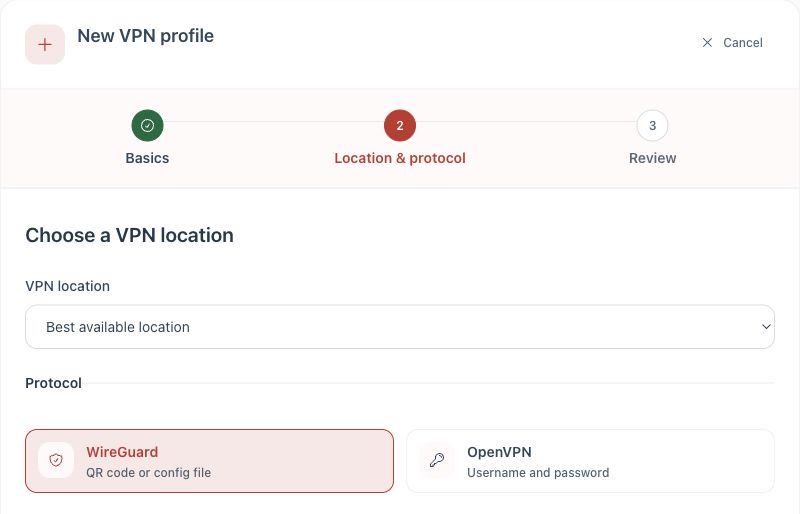
2. Location and protocol. Choose a location, or leave it on Best available location, and choose WireGuard or OpenVPN.
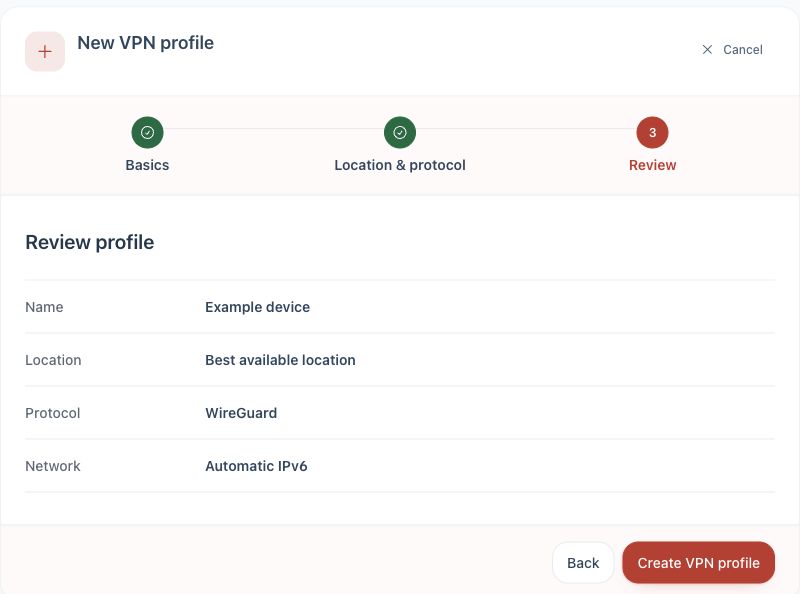
3. Review. Check the name, location, protocol and network settings, then choose Create VPN profile.
WireGuard or OpenVPN?
| WireGuard | OpenVPN | |
|---|---|---|
| Best for | Anything that supports it: routers with a WireGuard client, Linux, NAS drives | Older routers and devices that only accept an .ovpn file |
| You get | A .conf file and a QR code | An .ovpn file plus a username and password |
| Sign-in on the device | None: the key is in the file | The profile's own username and password, shown by Show OpenVPN credentials |
If a device supports both, use WireGuard. It's simpler to set up and there's nothing to type. Our post on choosing between WireGuard and OpenVPN goes into more detail.
The OpenVPN password belongs to that profile. It is not your TekLan VPN password, so never type your account password into a router or NAS.
Getting the profile onto the device
Under Send profile you have three ways to move it:
- Download: save the file on the computer you're using, then upload it in the router's or NAS's VPN settings.
- Email: send the file to your account email address as an attachment.
- Device access code: choose Get code, then on the device itself open
dash.teklanvpn.com/get, enter the code and download the profile. This is the easy way onto a TV browser, Steam Deck or Raspberry Pi. A code works once and expires after 15 minutes, and getting a new code cancels the old one. Codes are for WireGuard profiles only; move OpenVPN profiles by download or email.
For WireGuard on a phone or tablet, you can scan the QR code in the WireGuard app instead.
One profile per device
Make a separate profile for each device, and don't copy a WireGuard profile onto a second device. Two devices using the same WireGuard key knock each other offline. Separate profiles also mean that when you replace a router or sell a NAS, you can remove that one profile without touching anything else.
Profile files contain the device's private key. Once the device is set up, delete the downloaded copy and the email.
Consoles and TVs without VPN settings
PlayStation, Xbox, Nintendo Switch, Samsung, LG and Roku TVs, and many smart-home devices have no VPN settings of their own. Put the profile on a router that supports WireGuard or OpenVPN, then send just those devices through the VPN if your router allows it. Our post on putting TekLan VPN on your router walks through it, and the router guide covers GL.iNet, ASUS, TP-Link, OpenWrt, UniFi, pfSense and MikroTik.
Frequently asked questions
Does a Dashboard profile use one of my plan's connections?
Yes, while it's connected. A router counts as one connection, however many devices sit behind it.
I lost the profile file. Can I download it again?
Open the device in the Dashboard and use Send profile again. If you think a copy has gone somewhere it shouldn't, remove that profile and create a new one.
Should I use the Dashboard on my phone or computer?
Usually not. The TekLan VPN apps are easier, let you change location in a tap, and keep you protected away from home.
Every device has its own guide, with the Dashboard steps and the device's settings: Synology, Linux, Raspberry Pi and more in the setup guides.